 Setup
SetupSets how the instrument should power on and activate certain presets.
|
GUI Location |
System Menu (triple bar icon) > Settings (gear icon) > Power On/Preset |
|
Initial S/W Revision |
A.01.00 |
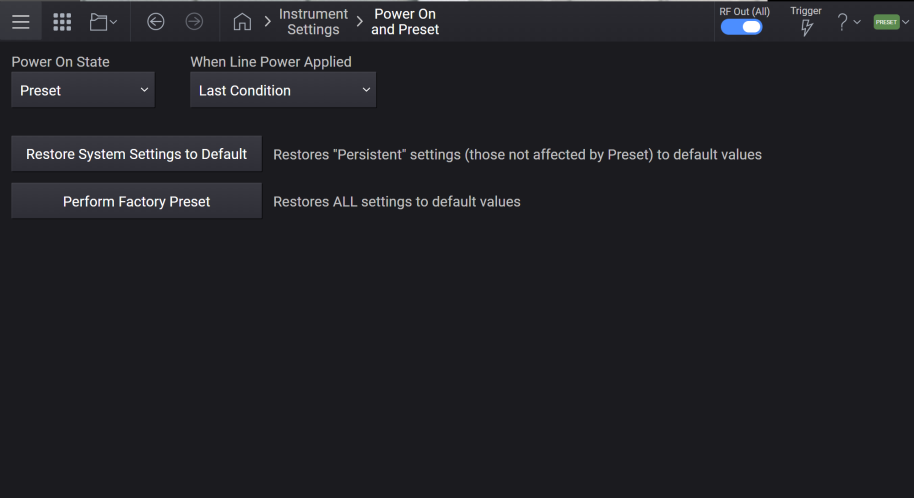
Enables you to select whether the instrument powers up in a default state or some other state.
PRESet: Instrument powers up in the default preset state.
USER: Instrument powers up in the user-defined power-on state.
LAST: Instrument powers up in the state it was in when last shut down.
|
GUI Location |
System Menu (triple bar icon) > Settings (gear icon) > Power On/Preset > Power On State |
|
SCPI Command |
:SYSTem:PON:TYPE PRESet|USER|LAST :SYSTem:PON:TYPE? |
|
SCPI Example |
:SYST:PON:TYPE PRES :SYST:PON:TYPE USER :SYST:PON:TYPE LAST |
|
Preset |
This is unaffected by a Preset but is set to Preset on a "Restore System Settings to Default Values". |
|
State Saved |
Persistent, survives preset and power cycle but not saved in the instrument state. |
|
Initial S/W Revision |
A.01.00 |
Sets the states that are not affected by signal generator power–on, Preset, or *RST to their factory default settings.
Most settings are affected by Preset, but there are some settings that are unaffected. These are called persistent variables. The system and each application will list its persistent variables. To reset these, select Restore System Settings to Default.
When this control is selected, the following message appears:
"This will reset all persistent variables to their default state. This action cannot be undone. Do you want to proceed?"
The message provides an and button to let you affirm or cancel the operation.
|
GUI Location |
System Menu (triple bar icon) > Settings (gear icon) > Power On State > Restore System Settings to Default |
|
SCPI Command |
:SYSTem:PRESet:PERSistent |
|
SCPI Example |
:SYST:PRES:PERS |
|
Initial S/W Revision |
A.01.00 |
Sets all states of the signal generator back to their factory default settings, including states that are not normally affected by signal generator power–on, Preset, or *RST.
When selected, the following message appears:
"This will reset all variables (including System variables) to their default state. This action cannot be undone. Do you want to proceed?"
The message provides an and button to let you affirm or cancel the operation.
|
GUI Location |
System Menu (triple bar icon) > Settings (gear icon) > Power On/Preset > Perform Factory Preset |
|
SCPI Command |
:SYSTem:PRESet:ALL |
|
SCPI Example |
:SYST:PRES:ALL |
|
Notes |
No confirmation is required when the SCPI command is sent |
|
Initial S/W Revision |
A.01.00 |
Defines whether *RST performs a factory preset or the user preset saved in memory.
NORMal: *RST restores factory-defined default values.
USER: *RST restores the user-defined preset state saved in the instrument. See Save User Preset.
|
SCPI Command |
:SYSTem:RST:CONFigure NORMal|USER :SYSTem:RST:CONFigure? |
|
SCPI Example |
:SYST:RST:CONF USER :SYST:RST:CONF? |
|
Dependencies |
Applies only when SCPI Backwards Compatibility Mode is E82x7D. Otherwise, applies NORM, regardless of value. See SCPI Backwards Compatibility Mode. |
| Preset | This setting is unaffected by Preset. It is reset to NORMal on Restore System Settings to Default Values. |
| Range | Normal|User |
| State Saved | Persistent, survives preset and power cycle but not saved in the instrument state. |
| Backwards Compatibility SCPI |
N51xxB :SYSTem:RST:CONFigure |
|
Initial S/W Revision |
A.20.00 |